Connecting a wireless microphone to your phone may sound simple, but for many creators, it quickly becomes confusing. Different smartphones use different ports, wireless microphone systems come with various receivers, and compatibility issues can ruin recordings if you’re not prepared. Whether you’re a YouTuber, vlogger, podcaster, online teacher, journalist, or mobile content creator, learning how to connect a wireless mic to phone correctly is essential for achieving clear, professional-quality audio.
This ultimate guide is designed to remove all confusion around wireless microphone setup for phones. You’ll learn how phone-compatible wireless microphones connect to Android and iPhone devices, which models work best for mobile recording, and what technical features you should consider before buying. We’ll also review the best wireless microphones for smartphones, explain key benefits like low-latency audio, noise reduction, and signal stability, and answer common questions. If you want reliable sound and a confident buying decision, this guide is for you.
How to Connect a Wireless Mic to iPhone (Lightning & USB-C)
iPhone connection depends on your model and charging port.
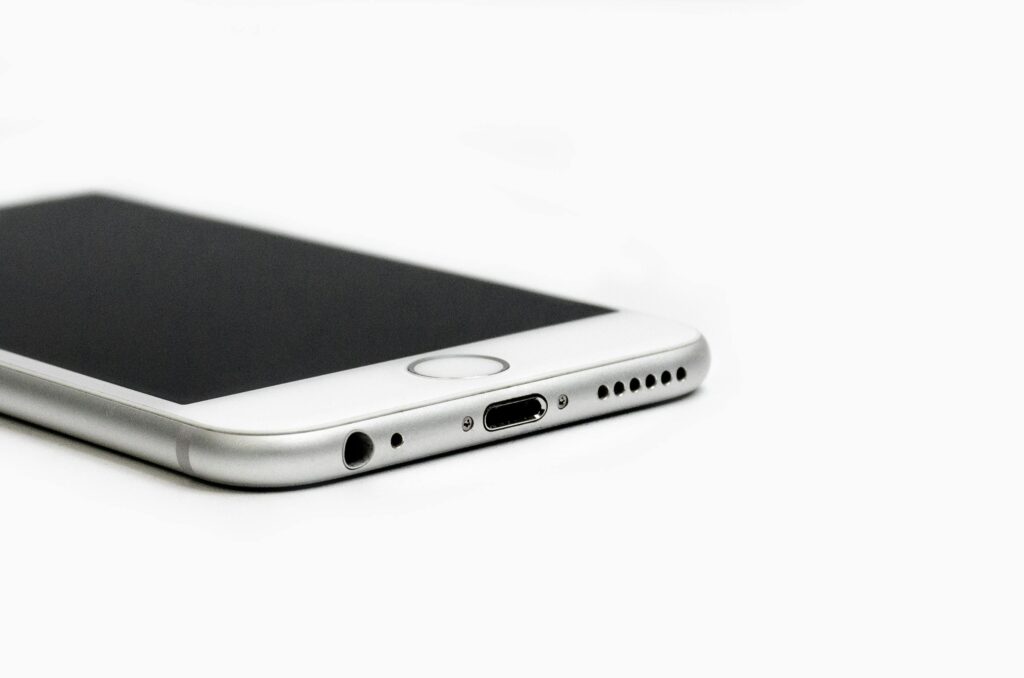
For iPhone with Lightning Port (iPhone 14 & older)
Step 1: Use a Lightning-Compatible Receiver
Make sure your wireless mic includes a Lightning receiver or an Apple-certified Lightning adapter designed for external microphones.
Step 2: Plug in the Receiver
Insert the receiver firmly into the Lightning port.
Step 3: Turn On the Transmitter
Power on the wireless lavalier microphone. Most modern systems auto-pair using 2.4GHz digital transmission.
Step 4: Allow Microphone Access
Tap Allow when iOS requests microphone permissions.
Step 5: Open Recording App
Open Camera, Voice Memos, YouTube, Instagram, or any third-party recording app.
Step 6: Record & Test
Record a short clip to confirm the external wireless mic is active.
For iPhone with USB-C Port (iPhone 15 & newer)
- Plug the USB-C wireless mic receiver into your iPhone
- Turn on the transmitter
- Grant microphone permissions
- Open your recording app
- Test audio levels and adjust gain if needed
Your wireless microphone is now connected to iPhone.
How to Check If Your Wireless Mic Is Working
- Speak while recording and observe the audio waveform
- LED indicators on the transmitter should be active
- Audio should sound louder and clearer than the built-in mic
- Always test in a quiet environment before recording
Important Notes for Best Performance
- Connect the receiver before opening recording apps
- Stay within the recommended wireless transmission range
- Maintain line-of-sight for stable signal
- Use a windscreen for outdoor recording
- Reduce interference by avoiding nearby Bluetooth devices
Quick Fix: Wireless Mic Not Working on Phone
| Problem | Quick Solution |
| Phone not detecting mic | Replug receiver, restart phone |
| No sound recorded | Enable microphone permissions |
| Distorted audio | Lower mic gain |
| Signal drops | Reduce distance, remove obstacles |
| Background noise | Enable noise reduction |
Best Wireless Microphones for Phones – Short Reviews
1. Rode Wireless GO II
The Rode Wireless GO II is one of the best wireless microphones for phone recording. It connects seamlessly to Android and iPhone devices using USB-C or Lightning adapters, making it ideal for mobile creators. Audio quality is exceptionally clean, with low noise and strong vocal clarity. Its onboard backup recording ensures your audio is safe even if the phone disconnects. The dual-channel system allows two-person recording, perfect for interviews, podcasts, and mobile filmmaking. If you want professional-grade wireless audio for your smartphone, this mic is a top-tier investment. Buy Now;
2. DJI Mic
DJI Mic offers a smooth plug-and-play wireless microphone setup for phones. It includes both USB-C and Lightning adapters, allowing instant smartphone compatibility. The touchscreen receiver lets you adjust gain levels easily, even mid-recording. Audio output is natural and balanced, while the charging case extends battery life significantly. With strong wireless range and reliable outdoor performance, DJI Mic is ideal for travel vloggers and professional content creators who demand stable mobile audio recording. Buy Now;
3. Hollyland Lark M2
The Hollyland Lark M2 is a compact wireless microphone for smartphones, designed for portability and convenience. It delivers clean voice capture with effective noise reduction, especially impressive for its price range. The lightweight design makes it perfect for TikTok, Reels, and YouTube Shorts. Battery life is solid, and the wireless connection remains stable for everyday use. If you want a budget-friendly wireless mic for phone videos, the Lark M2 offers excellent value. BUY Now;
4. Boya BY-WM3T2
The Boya BY-WM3T2 is a beginner-friendly wireless lavalier microphone for phones. Available in USB-C and Lightning versions, it offers true plug-and-play simplicity. While it lacks advanced features like onboard recording, it significantly improves audio quality compared to built-in phone microphones. Ideal for vlogging, online classes, and casual content creation, Boya is a smart entry-level choice for anyone learning how to connect a wireless mic to phone. BUY Now;
Buyer’s Guide – What to Know Before Buying a Wireless Mic for Your Phone
Before choosing a wireless microphone, understanding technical features ensures better compatibility and performance.
1. Phone Compatibility
- Android: USB-C receiver required
- iPhone: Lightning or USB-C depending on model
Always confirm connector support.
2. Wireless Technology
Choose 2.4GHz digital wireless microphones for:
- Low latency
- Better sound quality
- Stable signal
Avoid Bluetooth-only mics for professional use.
3. Plug-and-Play vs App Control
- Plug-and-play = beginner-friendly
- App-controlled = advanced audio tuning
4. Audio Quality & Noise Reduction
Look for:
- Wide frequency response
- Built-in noise cancellation
- Windscreens for outdoor use
5. Battery Life
- 5–7 hours minimum
- Charging cases add convenience
- USB-C fast charging saves time
6. Portability
Small, lightweight mics are best for phone creators.
7. Price vs Features
- Budget: Boya
- Mid-range: Hollyland
- Premium: Rode & DJI
Additional Information – FAQ, Notes & Tips
FAQ
1. How do I connect a wireless mic to my phone?
Plug the receiver into your phone’s USB-C or Lightning port and power on the mic.
2. Do wireless mics work with camera apps?
Yes, most work with native camera apps and social media platforms.
3. Why isn’t my phone detecting the mic?
Check permissions, connector type, and power status.
4. Do I need an app?
Not always. Many wireless microphones are plug-and-play.
5. Is a wireless mic better than a built-in mic?
Yes, wireless mics provide clearer voice capture and reduced noise.
Conclusion
Learning how to connect a wireless mic to phone is essential for anyone serious about mobile content creation. With the right phone-compatible wireless microphone, your smartphone can deliver professional-level audio quality. By understanding compatibility, wireless technology, audio features, and battery performance, you can confidently choose the best mic for your needs.
From premium solutions like Rode Wireless GO II and DJI Mic to affordable options like Hollyland and Boya, there’s a wireless microphone for every creator and budget. This guide helps you connect correctly, avoid common mistakes, and make a smart buying decision. Clear audio builds trust, increases engagement, and elevates your content instantly—so choose wisely and let your voice be heard clearly.